Table of Contents
- Introduction
- The Reason Your Film Team Should Have a Video Collaboration Platform.
- Common Mistakes to Avoid
- Last Checklist Before the Selection.
- Conclusion
- FAQs
1. Introduction
In the contemporary world, where the production process has been extremely fast, filmmaking is not restricted to one editing room. Directors, editors, producers, colorists, and sound designers are usually located in separate cities – or even countries. That is the reason why selecting the appropriate video collaboration platform for your film team has become a crucial move.
Here, we are going to dissect how to select the appropriate video collaboration platform forr your film team, the features that are the most important, and how to avoid the pitfalls.
2. The Reason Your Film Team Should Have a Video Collaboration Platform.
The contemporary film production is associated with:
- Large video files
- Multiple versions of edits
- Client feedback in real-time.
- Tight deadlines
- Remote team members
In the absence of an organized video collaboration platform, the groups tend to use emails, third-party drives, or arbitrary file-sharing applications. This leads to:
- Lost footage
- Confusing version control
- Security risks
- Delayed approvals
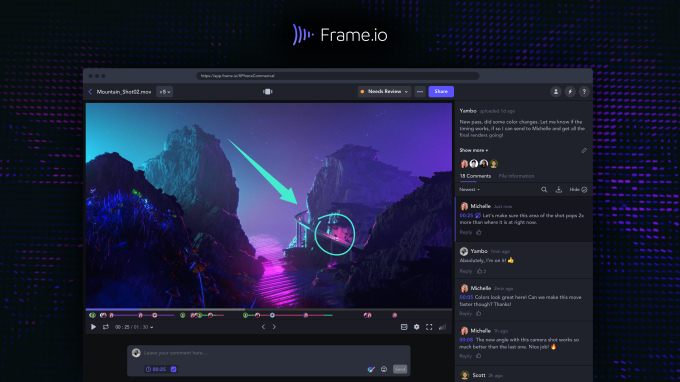
A professional video collaboration platform that serves film teams is a platform that will allow them to store all the information in a single safe place, including files, comments, edits, and approvals. Many professional film teams rely on Frame.io – a professional video review and collaboration platform to streamline frame-accurate feedback and approval workflows- Frame.io.
Learn the Workflow of Your Team.

Analysis of your workflow: Before choosing any tool, analyse it:
- What are the editors working with: Adobe Premiere Pro, Final Cut Pro, or DaVinci Resolve?
- Do you operate with a 4K or 8K video?
- Should there be frame-accurate feedback in clients?
- Is your team entirely remote or Hybrid?
Your video teamwork application should have the ability to fit into your editing software and production pipeline. Without a proper integration, your team will end up losing time in exporting and re- uploading files over and over again.
Pro Tip: It is always necessary to select the platform that will not disrupt the existing workflow but rather complement it by making your team adjust to complex procedures.
Emphasize Real-Time Review and Feedback Tools.
Real-time feedback is one of the largest advantages of a video collaboration platform.
Look for features like:
- Frame-accurate commenting
- Timestamp-based notes
- On-screen drawing tools
- Version comparison
When the directors and the producers are able to leave feedback on the timeline, the editors save hours of guesswork. According to Gartner’s cloud collaboration software research insights, investing in the right digital collaboration tools significantly improves workflow efficiency and team productivity: Gartner Information Technology.
Instead of emails like:
At 1: 23, is it possible to smooth that transition?
You get:
Comment nailed at this very moment at 01:23:14, which is visual evidence.
Such a clear state of mind is a huge productivity boost.
Check File Management/ Version Control.
The film projects produce huge amounts of data. To be featured in your video collaboration solution, it must have:
- Systematized folder systems.
- Clear version history
- Automatic backups
- Media tracking
In the absence of version control, a team stands the risk of working on old versions.
For example:
- Editv3final
- Editv3finalrevised
- Editv3finalrevised_NEW
This disorder is typical when the teams do not adopt a systematic video collaboration system.
An appropriate system holds all versions in the records, and they are not lost, to prevent confusion and save on your production schedule.
Assess Security and Access Control.
Film content is sensitive. Exposed videos will hurt marketing efforts and distribution contracts.
Your video teamwork software for your film team must have:
- Encrypted file transfers
- Password-protected access
- Role-based permissions
- Watermarking options
Security is particularly important in commercial projects, documentaries, and unreleased films.
Do not sacrifice the security of data when selecting a video collaboration platform.
Taking into account Cloud Storage and Performance.
Video files that are of high resolution demand powerful infrastructure.
Ensure that the platform can offer:
- High speeds of uploading and downloading.
- Cloud-based storage
- Scalable storage plans
- Smooth streaming playback
Sluggish playback or sluggish uploads may interfere with the editing schedule.
An efficient video conferencing system ought to enable your team to view quality-movie footage without the need to buffer every time.
Search with Integration with Editing and Production Tools.
The most appropriate video collaboration tool interacts with video editing and production software.
As an example, it can be integrated with:
- Frame.io
- Slack
- Trello
It has integration that enables automatic notices, task updates, and direct import/export workflows.
The fewer manual processes you have to go through on a process, the better your team is.
Evaluate Scalability to Growth.
Perhaps you have five members in your existing team. But what about next year?
Select a video conferencing solution that can scale to:
- Larger teams
- Multiple projects
- Increased storage needs
- Client access expansion
Changing platforms during manufacture is hectic. Choose your solution in the long-term.
Compare Pricing vs. Value
Budget always matters. However, the most affordable is not always the option.
Assess, instead of a monthly cost, an evaluation:
- Time saved
- Reduced errors
- Improved team productivity
- Faster client approvals
A good video collaboration system can easily be self-successful because it enhances efficiency in the workflow.
Test Before Committing
The majority of professional video collaboration solutions have free trials.
Before purchasing:
- Work on a small project using the system.
- Test feedback tools with the team members.
- Check upload speeds
- Evaluate user experience
In case your company ends up perplexed by your team, there will be no adoption.
It is as important as user-friendly design as sophisticated features.
3. Common Mistakes to Avoid
When selecting a video collaboration tool to use in your film crew, do not make the following mistakes:
- Disregard of the compatibility of integrations.
- Choosing based only on price
- The neglect of security features.
- Failure to test using actual workflows.
- The choice of excessively complicated tools.
Due to the savings of time and money in the long run, smart decision-making saves money.
4. Last Checklist Before the Selection.
Ensure that before making your final video collaboration platform:
- It is combined with your editing software.
- It facilitates the high-resolution footage.
- It provides real-time feedback applications.
- It offers safe file transfer.
- It fits your budget
- It can be extended with the increase in your production.
When there is a check mark in all the boxes, then you are heading in the right direction. In addition to collaboration tools, choosing the right software to organize video files ensures faster sorting, structured media management, and smoother post-production workflows.
5. Conclusion
The selection of the appropriate video collaboration tool to join your film team is not only a technical choice but a strategic choice. The appropriate platform enhances communication, safeguards valuable footage, streamlines feedback, and increases the speed of project delivery.
Anything in contemporary filmmaking is all about cooperation. An efficient video collaboration tool will help keep the editors, directors, producers, and clients in line during the production process.
You should spend time on analyzing your workflow, trying out the options available, and putting an emphasis on usability and security. Prudently selected, your video cooperation platform is the core of your whole filmmaking process. If your team struggles with deadlines, using video project tracking software can help editors stay organized and meet delivery timelines more efficiently.
6. FAQs
What does a film team video collaboration platform mean?
A video collaboration platform is a web-based platform that enables film teams to exchange videos, view edits, post comments with time stamps, and control and manage versions in a single, centralized workspace.
Why do we need real-time feedback in video collaboration?
On-the-fly feedback enhances the rate of communication, revision time, and also makes sure that editors are aware of the changes to be made at a particular time.
Are small film teams able to gain the advantages of a video collaboration platform?
Yes. A well-organized video collaboration platform is used even by a small team of filmmakers and helps to enhance efficiency, file organization, and communication.